
A consultant flying 80,000 miles per year told me his biggest regret wasn’t a missed flight or a lost client — it was the $1,800 MacBook Pro that died because his “laptop bag” had padding thinner than a napkin. One drop on an airport floor, one set-down on a wet taxi seat, and his primary work tool was gone. Choosing the right laptop commuter bag for busy professionals isn’t about finding something that merely holds a computer. It’s about finding a protective system that safeguards your most expensive daily tool while keeping you organized, comfortable, and professional across airports, offices, coffee shops, and client sites — all in a single day. A proper laptop commuter bag combines military-grade device protection with professional aesthetics and organizational intelligence that eliminates the daily “where did I put that” frustration.
Professionals who move between multiple locations daily — office, client meetings, co-working spaces, airports — need bags that perform differently than someone who drives to one office and sits at one desk. Your bag becomes your mobile office, your filing cabinet, and your laptop’s only line of defense against the physical world. According to a 2024 Targus survey, professionals replace laptops damaged by inadequate bags every 2.3 years on average — a completely preventable expense. The right laptop commuter bags eliminate that risk entirely while making your daily transitions between locations seamless rather than stressful.
What Laptop Protection Features Actually Matter for Professionals?
A suspended laptop sleeve with minimum 1.5cm closed-cell foam padding on all sides, a separate dedicated compartment, and a secure closure mechanism are the three non-negotiable protection features for professional laptop bags.
Protection features ranked by importance:
- Suspended/elevated sleeve (critical): The laptop hangs above the bag’s base, never touching the bottom. When you set the bag down — on wet floors, hard surfaces, or accidentally drop it — the laptop stays protected by an air gap.
- Dedicated compartment (critical): Laptop lives in its own section, completely separated from other items. Water bottles, pens, and chargers can’t contact or scratch the device.
- Closed-cell foam padding (critical): Minimum 1.5cm on all sides including top and bottom. Open-cell foam compresses over time and loses protection. Closed-cell maintains structure for years.
- Secure closure (important): Magnetic flap, velcro, or zipper that prevents the laptop from sliding out if the bag tips or is carried upside down momentarily.
- Rigid frame panels (nice to have): Semi-rigid panels on the laptop compartment’s exterior prevent crushing from external pressure (packed trains, overhead bins).

What Size Laptop Bag Do Professionals Need?
Match your bag to your laptop size plus 1.5 inches of clearance: 13-inch laptops need bags rated for 14 inches, 15-inch laptops need bags rated for 16 inches. This clearance accommodates cases, sleeves, and padding thickness.
Size guide for professionals:
| Laptop Size | Minimum Bag Rating | Recommended Bag Volume | Best For |
|---|---|---|---|
| 13″ (MacBook Air/Pro 13) | 14″ sleeve | 15–20L | Light travelers, minimal carry |
| 14″ (ThinkPad, Dell 14) | 15″ sleeve | 18–25L | Standard professionals |
| 15–16″ (MacBook Pro 16, XPS 15) | 16–17″ sleeve | 22–30L | Power users, designers |
| 17″ (workstation laptops) | 18″ sleeve | 28–35L | Engineers, video editors |
Common mistake: buying a bag rated exactly for your laptop size. A “15-inch laptop bag” often fits a 15-inch laptop with zero clearance — meaning your laptop in a thin sleeve won’t fit. Always size up one inch from your actual device measurement.
How Should a Professional Laptop Bag Be Organized?
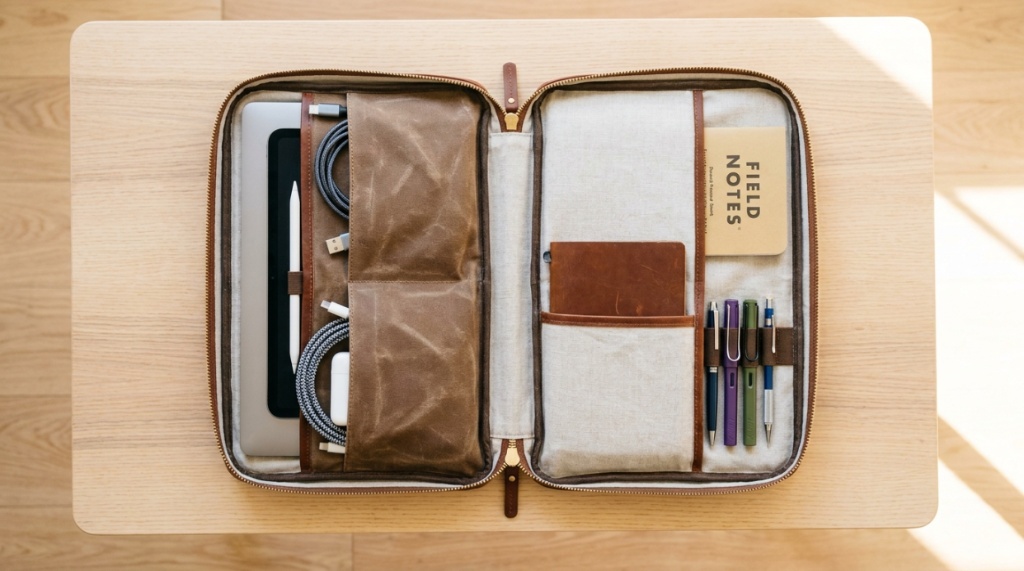
The ideal professional laptop bag has three distinct zones: a protected tech zone (laptop + tablet), an organized work zone (documents, notebook, pens), and a quick-access personal zone (phone, wallet, keys, transit card).
Optimal organization layout:
- Tech zone (rear compartment): Padded laptop sleeve, tablet pocket, cable/charger pocket with elastic organizers. Keeps all electronics together and protected.
- Work zone (main compartment): Space for notebook/planner, document folder, business cards, pens, reading glasses. Structured enough to find items without digging.
- Personal zone (front/external pockets): Quick-access phone pocket, key clip, wallet slot, transit card window. Reachable without opening main compartment.
- Utility zone (side/bottom): Water bottle pocket, umbrella sleeve, sunglasses case. Items you need occasionally but don’t want mixing with work materials.
The test of good organization: can you find your phone, keys, and laptop charger within 5 seconds each without looking inside the bag? If yes, the organization works. If you’re digging through a single large compartment, the bag fails the professional efficiency test.
What’s the Best Laptop Bag for Professionals Who Fly Frequently?
A TSA-friendly laptop bag with a lay-flat butterfly opening, luggage pass-through sleeve, and dimensions that fit under airline seats (max 18″x14″x8″) eliminates airport friction for frequent flyers.
Air travel features for professional laptop bags:
- TSA checkpoint-friendly design: Laptop compartment opens flat (180°) so you don’t need to remove the laptop during security screening. Saves 2–3 minutes per checkpoint.
- Luggage pass-through: Rear sleeve slides over rolling suitcase handle. Essential for navigating airports without juggling multiple bags.
- Under-seat dimensions: Bags under 18″x14″x8″ fit under all airline seats including regional jets. Guarantees you keep your laptop accessible during flight.
- Quick-access pocket for boarding pass/passport: External pocket sized for travel documents, reachable while bag is under the seat ahead.
- Compression straps or expandable design: Compress for daily commute, expand for travel days when you’re carrying extra items.
How Do You Choose Between a Laptop Backpack and Laptop Briefcase?
Choose a backpack if your commute involves walking more than 15 minutes or carrying over 10 lbs daily. Choose a briefcase if your environment is strictly corporate and your commute is primarily car or short taxi rides.
Decision framework:
- Choose backpack when: Walking commute over 15 minutes, carrying 10+ lbs, need hands free for phone/coffee, work in tech/creative/modern corporate, travel frequently
- Choose briefcase when: Car/taxi commute, carrying under 8 lbs, work in finance/law/traditional corporate, client-facing roles requiring maximum formality
- Choose messenger when: Mixed commute (transit + walking), need quick access to contents, work in media/consulting/sales, prefer crossbody carry
- Choose convertible when: Can’t decide (backpack straps + briefcase handle), move between formal and casual environments, want maximum versatility
The trend in 2025: professional backpacks are now accepted in virtually every industry except the most traditional finance and law firms. If you’re unsure, a clean-designed backpack in black or navy works everywhere.
What Comfort Features Prevent Shoulder and Back Pain?
Padded shoulder straps with load lifters, a sternum strap, ventilated back panel, and proper weight distribution prevent the chronic shoulder and back pain that affects 40% of daily bag commuters.
Ergonomic features by bag type:
- Backpacks: Look for contoured shoulder straps (S-shaped), load lifter straps (pull weight toward your back), sternum strap (prevents straps sliding off shoulders), and padded hip belt for loads over 15 lbs.
- Messenger bags: Wide shoulder pad (minimum 3 inches), crossbody strap with anti-slip backing, and bag stabilizer strap that prevents swinging during walking.
- Briefcases: Padded grab handle that distributes weight across your palm (not just fingers), and optional shoulder strap for longer carries.
Weight distribution rule: your laptop should sit closest to your back (in the rear compartment), with lighter items in front compartments. This keeps the center of gravity close to your body and reduces strain. A 12 lb bag with proper weight distribution feels lighter than an 8 lb bag with weight pulling away from your back.
How Do You Evaluate Laptop Bag Durability Before Buying?
Check zipper brand (YKK is the gold standard), stitching at stress points (should be reinforced/bar-tacked), material denier rating (minimum 600D for daily use), and warranty terms (minimum 3 years for quality bags).
Durability indicators:
- Zippers: YKK or RiRi zippers last 10+ years. Unbranded zippers are the #1 failure point in bags. Check that zipper pulls are metal, not plastic.
- Stress point stitching: Where straps attach to the bag body should show bar-tack stitching (dense rectangular stitch pattern). Single-line stitching at stress points will fail within 1–2 years.
- Material weight: 600D nylon minimum for daily use. 1000D for heavy use. 1680D for maximum durability. Lower denier tears more easily.
- Hardware: Metal buckles, D-rings, and snap hooks outlast plastic equivalents by 5–10x. Check all connection points.
- Warranty: Brands confident in their construction offer 3–5 year or lifetime warranties. 1-year warranty signals the manufacturer expects failure.
What Are the Best Laptop Bags for Professionals Under $300?
The Aer Tech Pack, Bellroy Transit Workpack, Peak Design Everyday Backpack, and Tumi Alpha Bravo Navigation offer the best combination of laptop protection, professional design, and durability under $300.
Top picks:
- Aer Tech Pack 3 ($200): Purpose-built for tech professionals. Excellent laptop protection, clean design, water-resistant Cordura. Best for minimalists who carry tech gear.
- Bellroy Transit Workpack ($249): Premium materials, thoughtful organization, slim profile. Best for professionals who want refined aesthetics without luxury pricing.
- Peak Design Everyday Backpack ($280): Innovative FlexFold dividers, weatherproof, expandable. Best for creative professionals who carry cameras alongside laptops.
- Tumi Alpha Bravo Navigation ($295): Corporate standard, ballistic nylon, extensive organization. Best for traditional corporate environments and frequent flyers.
- Boundary Supply Errant ($170): Excellent value, modular organization, durable materials. Best budget option that doesn’t sacrifice protection or style.
Conclusion
Your laptop is your livelihood. The bag that carries it should protect that investment with the same seriousness you’d protect any $1,500–$3,000 tool. For busy professionals moving between locations daily, the right laptop commuter bag eliminates the anxiety of device damage, the frustration of disorganization, and the discomfort of poorly designed carry systems — all while maintaining the professional image your career demands.
Prioritize protection first (suspended sleeve, dedicated compartment, quality padding), organization second (three-zone layout, quick-access pockets), and aesthetics third (clean design, quality materials). A bag that nails all three exists at every price point from $150 to $500. The difference is material quality and longevity — not fundamental design intelligence. Choose based on your commute length, travel frequency, and workplace formality, and you’ll find a bag that serves you reliably for years.
What laptop do you carry and how does your typical day move between locations? Share in the comments — I’ll match you with the specific bag that handles your workflow best.
Frequently Asked Questions
What is the safest way to carry a laptop in a bag?
Use a bag with a suspended laptop sleeve in a dedicated rear compartment with minimum 1.5cm closed-cell foam padding. Position the laptop closest to your back for stability. Never carry a laptop loose in a main compartment where it can shift, contact hard objects, or fall out.
How much padding does a laptop bag need?
Minimum 1cm of closed-cell foam on all sides for basic protection. Premium bags offer 1.5–2cm. Avoid bags with only thin felt or fabric lining — these provide almost no drop protection. Test by pressing firmly on the padded sleeve; you shouldn’t feel the hard surface behind it.
Is a hard-shell or soft laptop bag better for professionals?
Soft bags with quality padding are better for professionals because they’re lighter, more flexible in tight spaces, and look more professional than hard-shell cases. Hard shells offer marginally better crush protection but add weight and bulk that’s impractical for daily commuting.
Can I put my laptop bag in an overhead bin?
Yes, but choose a bag with rigid frame panels around the laptop compartment to prevent crushing from other luggage. Alternatively, keep your laptop bag under the seat ahead for guaranteed protection and in-flight access to your device.
How often should I replace my laptop bag?
Quality laptop bags ($200+) last 5–10 years of daily use. Replace when padding compresses noticeably, zippers fail repeatedly, or straps lose structural integrity. If your bag no longer holds its shape when loaded, the internal structure has degraded and laptop protection is compromised.
What’s the best laptop bag for someone who walks a lot?
A backpack with padded contoured straps, load lifter adjustments, sternum strap, and ventilated back panel. Weight should be distributed with the laptop against your back. Brands like Aer, Bellroy, and Peak Design excel at comfortable carry for walking commuters.
Do I need a separate laptop sleeve inside my bag?
Not if your bag has a properly padded dedicated laptop compartment. Adding a sleeve inside an already-padded compartment adds unnecessary bulk and weight. However, if your bag’s laptop section has minimal padding (under 1cm), an additional neoprene sleeve ($20–$40) adds worthwhile protection.